📣 Announcement
Full visibility into what you're running, and what it's costing you 🔍
Billing accounts started as a way to consolidate billing, but this release turns them into something bigger: one place to see everything you run and what it's worth to keep.
A billing account can now link several organizations together, useful for a company organized into multiple business units, or for anyone managing organizations on behalf of several clients. The organization switcher has been reworked around this: a redesigned Organizations tab shows each organization's space count, a clear highlight for the one you're currently in, a quick menu to jump to its people or settings, and a flag on any organization that has hit its free space limit. A new Billing tab sits alongside it, listing every billing account you belong to and the organizations linked to each, and letting you set one up or link an org in a couple of clicks.
Sandbox organizations, introduced a few releases back as part of this same effort, give every billing account a dedicated space to test, demo, and experiment without touching production data or counting against your free tier or usage metrics. They're now fully woven into the billing workflow, and every space inside a sandbox organization displays a persistent banner in the viewers marking it as not for production use.
The new Billed spaces tab is where the spend conversation happens. It lists every space tied to a billing account with its size, renewal date, and paid until status, so you always know what's coming up. Archive a space ahead of time if you want to trim costs before it renews.
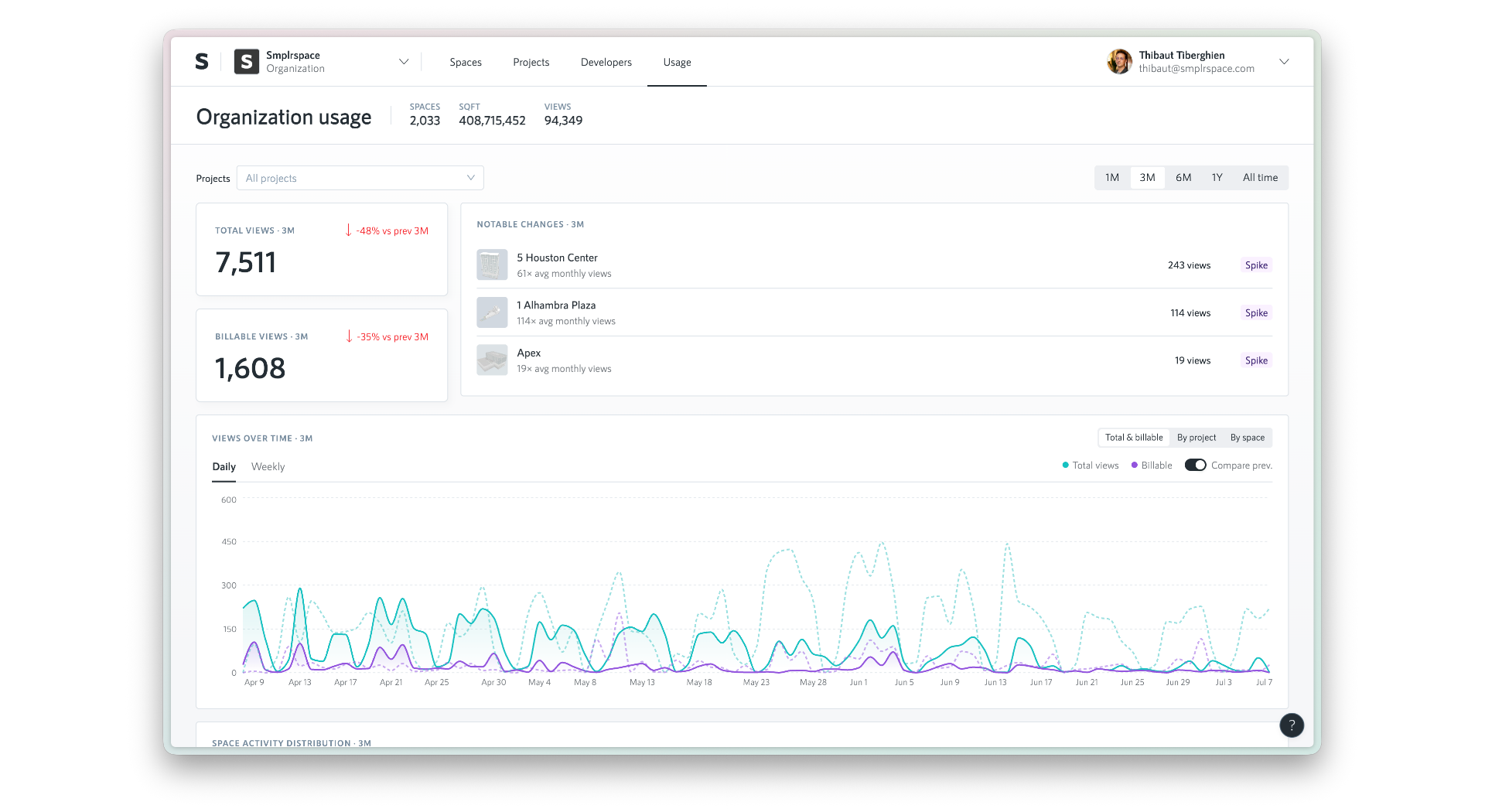
Usage analytics tie it all together, available at both the organization and billing account level. See total and billable views over time, day by day or week by week, compared against the previous period, spot notable spikes across your spaces, and break it all down by project or by space for the full picture.
Together, these give small teams a way to keep spend lean, and give larger operators running many organizations one place to see usage and impact across all of them, whether that's an ops lead, a portfolio manager, or a finance team that isn't in Smplrspace day to day.
🎉 New features
Until now, Projects was available to enterprise organizations only. It's now generally available to every organization. Group your spaces into a project for scoped access tokens and analytics, plus a map-based portfolio view, and for enterprise customers, an opt-in reporting environment.
You can now archive projects, just like spaces. Archived projects are hidden from your projects list by default, can be found with the new status filter, and can be unarchived anytime from the project settings.
You can now transfer a space between any of your organizations on the same billing account, not just from your personal account. Transfers move the space by default, with the option to keep a copy in the original organization.
You can now convert coordinates between geographic positions (longitude and latitude) and a space's local coordinate system in both directions, directly from the smplr.js SDK. This makes it straightforward to place geo-referenced data onto your floor plans, and to project local positions back onto a map. See the QueryClient geometry docs for the full reference.
Three editor updates come together to make glass facade walls dramatically faster to digitize:
You can now duplicate a window to all empty segments of a multi-segment wall in one action. Select a window and use "Add to all segments" from the right-click menu or the properties panel.
You can now expand a window to fill its entire wall segment in one action. Right-click a selected window and choose "Expand to segment", or press E. Combine it with "Add to all segments" and a facade wall goes from empty to fully glazed in two clicks.
You can now set a target panel width on multi-panel windows. The number of columns adjusts automatically to keep each panel close to that width, and re-adjusts as you resize the window.
We've dreamed about this one for a while, and it's finally here: natural, cursor-anchored zoom in the 2D editor. Scroll or pinch to zoom exactly where your cursor lands, pan by holding Shift while two-finger scrolling, drag in move mode, or use two fingers on a touchscreen.
💅 Improvements
Space.startViewer now calls your onReady callback in preview mode, so you can detect when the preview has finished loading without a workaround.
Space cards in your space list now display the number of levels in each space, in place of the total views count.
You can now see keyboard shortcuts right where you work in the editor. Contextual menus and action buttons show their shortcut next to each action, and a new keyboard shortcuts reference, opened from the help panel or by pressing ?, lists every shortcut organized by area.
The map viewer now respects white label settings: the "Powered by Smplrspace" attribution is hidden for white-label plans.
🐛 Bug fixes
We fixed an issue where the 3D viewer camera could center away from your space, which happened when a level had no ground and your space used coordinates far from the map origin.
We've fixed a rare issue where the spaces list could fail to load on very narrow screens.
Clearing the name of an editor item (window, door, wall, ground, roof, or stairs) no longer leaves two items showing the same name. When you clear a name, a fresh automatic name is generated.
We've fixed ground numbering in the editor. Adding grounds on a new level no longer skips numbers.
We've restored the type labels (e.g., shell, sliding) shown next to walls and doors in the component tree.
We've fixed an issue in reports where spaces with multiple stitch values in their entity field were silently not showing up. You can now use "|" as an OR separator on the entity side (e.g. "RoomA|RoomB"), while "+" continues to work for AND.
We've fixed an issue in reports where stitch fields pointing to custom extras columns were not resolving correctly. And the entity ID field can now also be referenced as "smplrUuid" in addition to "id", matching the CSV export.