📣 Announcements
Smplrspace in Power BI
Your floor plans now work inside Power BI. Add the Smplrspace Visual from the Microsoft Marketplace, drag your fields onto it, and your data lands on the floor plan, in 2D, 3D, or on a map across a whole portfolio.
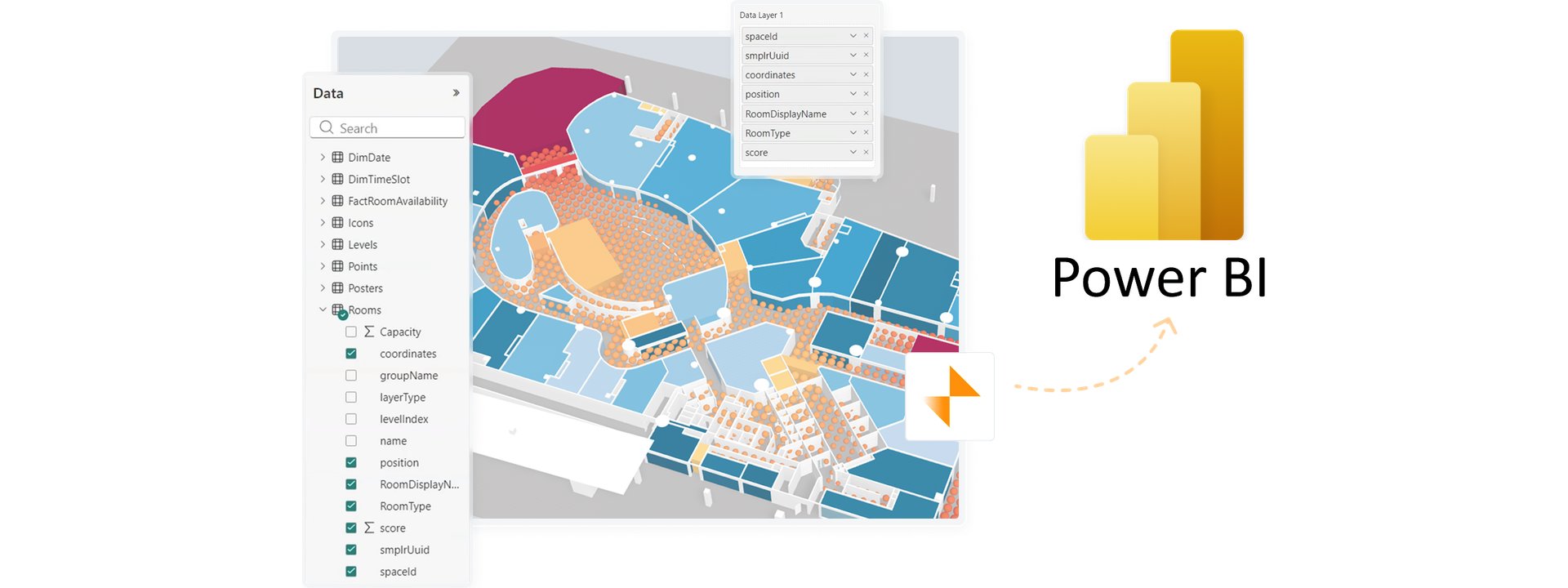
Select a room and the other visuals on the page filter to it, and the other way round. You can stack up to five data layers on one space and put your own fields in the tooltips. You need a Smplrspace account, and there is a free tier to start.
🎉 New features
You can now select many things at once in the layout and equipment editors. Hold Shift and drag a rectangle around what you want to select. Everything it touches is added to your selection, and anything already selected is deselected, so it works like Shift-clicking a whole area. Objects hidden behind walls or other objects are not included. In the layout editor, when a selection mixes types, the properties panel lets you keep only one type or remove a type from it.
You can now space windows and doors evenly along a wall. Duplicate a window a few times, place the first and last copies where you want them, select the openings on that wall segment, and choose "Spread equally" in the properties panel or the right-click menu. The ones in between move so the empty wall between neighbors is equal. It saves you from placing a row of identical windows by eye.
You can now check lines of sight with smplr.js.
checkVisibilitytells you which targets each viewpoint can see,checkPanelVisibilitytells you how much of a panel each viewpoint sees, andrenderForVisibilityrenders what a check needs. Walls, floors, and furniture block the line, while glass does not. Learn more in the docs.
💅 Improvements
You can now add a point before or after the point you right-click on a wall, hole, roof or ground. The new point appears close to where you clicked, at your current zoom, so you no longer have to zoom out to find it. It is no longer placed halfway along the segment. Windows and doors stay where they are, and selected points have a thicker outline.
Windows and doors now behave better when you edit a wall. When you move a wall point along its segment, they stay exactly where they are as long as they still fit. When they cannot stay in place, for example because you moved the point off the line, they keep their relative position along the wall. When you remove a point, they are kept instead of being deleted.
We have made automatic room detection more reliable. It now separates rooms where walls of different thickness meet, no longer fails on large or complex floors, and runs about four times faster.
🐛 Bug fixes
When you transfer a space to another organization, it now leaves the projects and tags of its previous organization, and the transfer dialog lists them before you confirm. Projects no longer show or count spaces that belong to another organization.
Deleted spaces no longer appear in the "not active" section of a project's spaces list. Archived spaces are still listed there.
We have fixed floor plans that uploaded successfully but never appeared when "Lossless (keep full quality)" was ticked on very large images. You now get a clear message instead, and nothing blank is saved.
We have fixed an error that could occur when leaving the editor while the desk cluster, seminar seating or parking cluster tool was open.
We have fixed redo in the editor. After an undo, the redo button and shortcut now bring your change back.
We have fixed an editor crash that could happen after deleting a level below the one you were editing, or after importing a space with fewer levels. The editor now stays on a valid level.
⚙️ Groundwork
We are finally saying farewell to Firebase and going all in on Cloudflare for your images and files, the same network that already serves the rest of Smplrspace. For you, that means images and floor plans that load faster from a network close to you, one less third party handling your files, and a lighter viewer. Embeds no longer load any Firebase scripts, which also helps on locked-down devices such as smart TVs.